My AI coding workflow

There are infinite opinions available how to use AI in software development. I haven't formed one, so I'm documenting what, so far has worked for me. I distinguish between the ideation phase, which's output is a set of specs, issues, tickets, whatever you call it and the implementation phase, which's output is working code.
The two phases run in sequence (doh), but not exclusive. E.g. while feature one and two run through implementation, feature three and four csn be in ideation. This post is about the implementation phase.
Chinese whispers (AI edition)
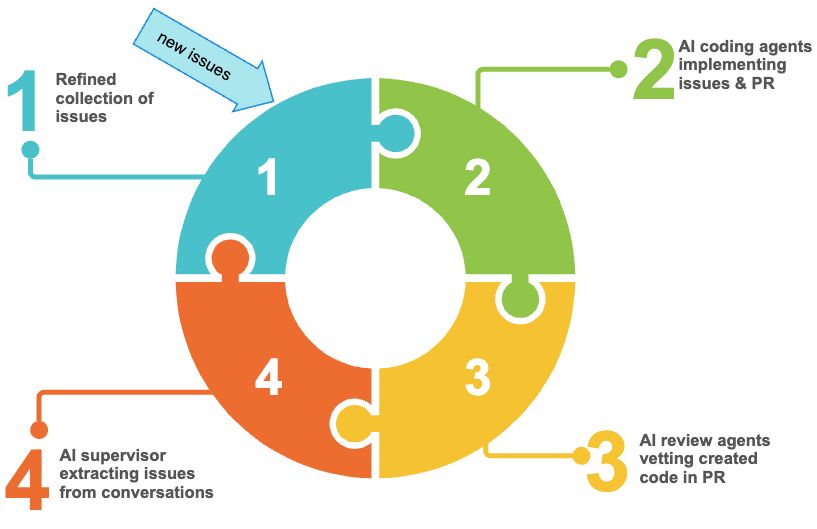
Based on the ideation phase I start with a set of github issues. They tend to be more than single sentence descriptions of an desired outcome. I launch multiple instances of Claude using claude -w, to enable the git worktree support. The exact number depends on your willingness to endure frequent context switching, I'm old so I stick to 2-4.
In each instance I follow the same prompt: "Plan and implement issue #42, share your assumptions, ask clarifying questions, outline options and seek approvals"
AI goes through a round of questions and challenges until we reach consensus and it implements the task at hand. Once done it creates a pull request. The creation of the pull request triggers code reviews. Currently that's GitHub Copilot review and CodeRabbit AI (disclaimer: the link is a referral link). Both agents review the code, come to conclusions and share them in conversations in the pull request. What's interesting is that they both highlight different issues with limited overlap. I'm particularly fond of CodeRabbit's "nitpick" level of feedback.
Once their review is completed, I let the PR merge, most of the time more that one from the various work trees. To close the feedback loop I then prompt: "Visit all pull requests [timeframe] and look for unresolved conversations. Assess each claim for merit and decide if it is still valid. When no longer valid, post your justification as comment. When still valid, create a new issue with detailed explanation and options, so any developer can understand and act on it, then add a comment linking to the issue. In both cases, mark the conversation as resolved."
This approach strikes a balance between "let the agent do its thing" and "keep the development transparent". If your source of truth for development tasks isn't GitHub issues, you need to adjust my approach.
All of this gets supported by CLAUDE.md, MCP, Skills, Tools etc, but that's another story for another time.
As usual YMMV
Posted by Stephan H Wissel on 08 May 2026 | Comments (0) | categories: AI Development