wissel.net

Usability - Productivity - Business - The web - Singapore & Twins

By Date: January 2026

Cumulative data modeling (Part 1)


The going approach to model data is drawing your ER Diagram and map it to your persistence, be it normalized in a RDBMS or an entry in a NoSQL store.

A slice of cake

Walking through the use case of a cheese cake factory, slightly simplified. All process steps happen in batches, but batch sizes are not synchronized. E.g. dough mixing produces 0.8 - 1.4 times the baking capacity.
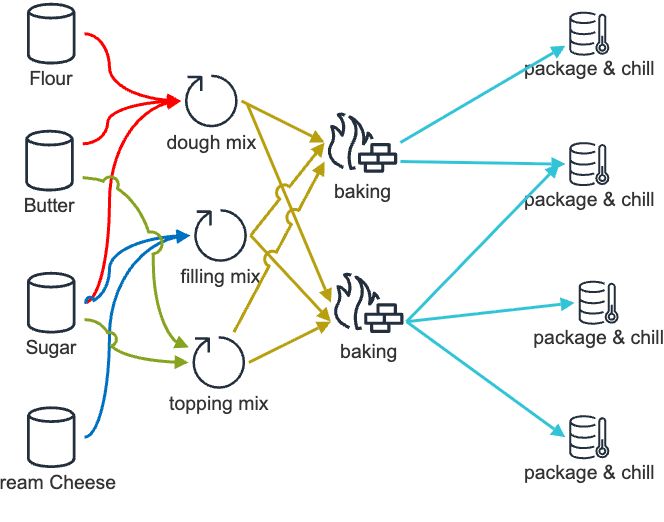
Cheesecake factory

The corresponding data model would look like this:
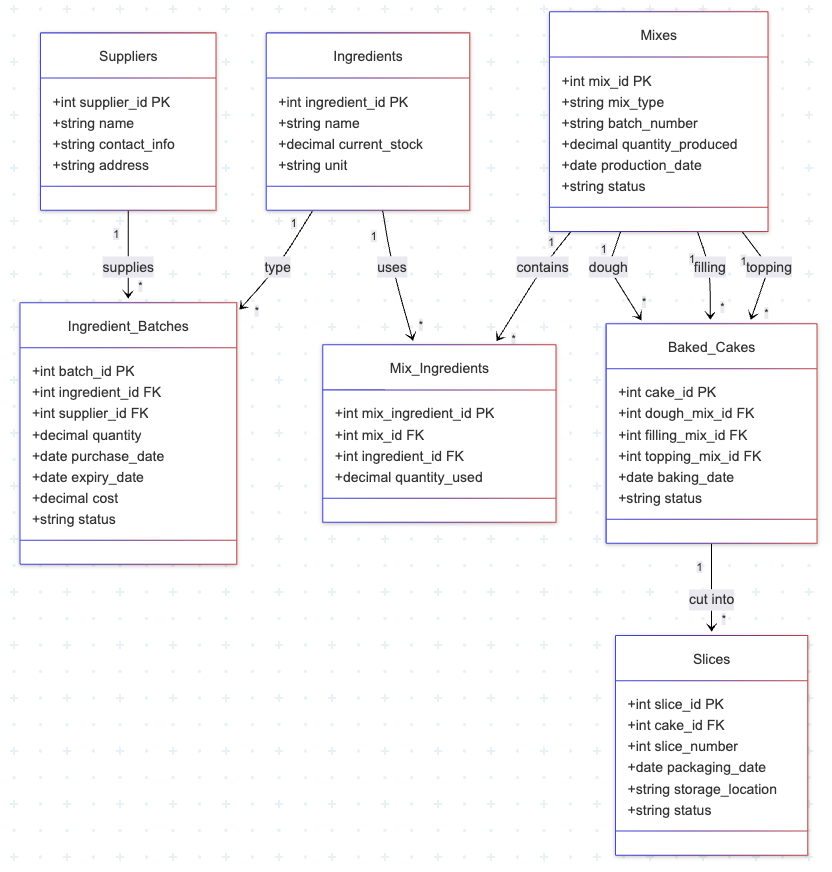
Cheesecake data model

Now imagine a customer wants to know if the slice is made with cheese from "happy cows", which is a trade certification some of the suppliers have. A simple SQL solves it:

SELECT
    s.slice_id,
    ROUND(
        (SUM(CASE WHEN sup.HappyCowCertified = TRUE THEN mi.quantity_used ELSE 0 END) /
         SUM(mi.quantity_used)) * 100,
        2
    ) AS happy_cow_percentage
FROM Slices s
JOIN Baked_Cakes bc ON s.cake_id = bc.cake_id
JOIN Mix_Ingredients mi ON (
    mi.mix_id = bc.dough_mix_id OR
    mi.mix_id = bc.filling_mix_id OR
    mi.mix_id = bc.topping_mix_id
)
JOIN Ingredients i ON mi.ingredient_id = i.ingredient_id
JOIN Ingredient_Batches ib ON mi.batch_id = ib.batch_id
JOIN Suppliers sup ON ib.supplier_id = sup.supplier_id
WHERE s.slice_id = 'someSliceId'
  AND i.name = 'Cream Cheese'
GROUP BY s.slice_id;

Another day another challenge: a batch from a supplier was sub standard and you need to recall all slices made with it. SQL to the rescue again:

SELECT DISTINCT
    s.slice_id,
    s.storage_location
FROM Slices s
JOIN Baked_Cakes bc ON s.cake_id = bc.cake_id
JOIN Mix_Ingredients mi ON (
    mi.mix_id = bc.dough_mix_id OR
    mi.mix_id = bc.filling_mix_id OR
    mi.mix_id = bc.topping_mix_id
)
WHERE mi.batch_id = 'someBadBatchId'
ORDER BY s.slice_id;

As long as as bakery control system has this baked in (pun intended) or you have your residential SQL jockey on speed dial, all is well (keep in mind: the real data model is way more complex), but there might be a better way, slightly unconventional. Stay tuned for part 2.


Posted by on 23 January 2026 | Comments (0) | categories: CouchDB Development NoSQL SQL

Running your SPA on Cloudflare


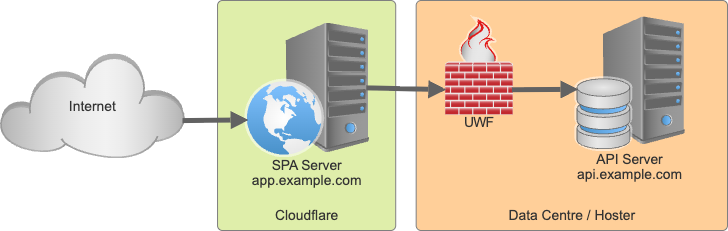
Your application is ready, you want to prepare for the incoming storm of users, so you separate your SPI server from your UI. To host the UI Cloudflare is chosen, while the API server sits in its data centre. There are a few steps to be had, which are simple, just the AI was acting cute, so I write it down.

Cloudflare hosted SPA

Workers & Pages

We shall update our single page application whenever new contenet gets merged into main. All calls to /api/* need to get routed to the API server. These are the steps that wrok. Nota bene: if you want to push from your local machine, the steps are different and a story for another time.

  • In Cloudflare head to Build, Compute & AI, Workers & Pages
  • Don't get distracted by the blue "Create application" button, you want to click above it and select + Add and then Pages (don't select "Worker")
  • Select "Import an existing Git repository" and select your repo (You need the GitHub integration for that).
  • configure your build settings, for a viteJS applicationa, the build command is npm run build and the output directory is dist. Save it and you are good to go.

Next step is to configure "Custom domains", so app.example.com points to your page. Follow the UI, it is almost automagic when Cloudflare is your DNS provider

Redirecting /api to the backend

We want Cloudflare to proxy it, not to 30x redirect. A client wouldn't know that the request gets forwarded. This will allow to harden the API (e.g. drop all request not coming from Cloudflare) later on. Also you don't have to deal with CORS.

Search, with and without AI, suggested solutions revolving around files:

  • create _routes.json
  • code _worker.js
  • use an elaborate wrangler setups.

Those all have one thing in common: they didn't work.

What worked: create a folder functions at the root of your repository. Inside add a file [[path]].js - yes, that's two pairs of square brackets and th letters p a t h. It's the catch all for functions. Inside you add:

export async function onRequest(context) {
  const { request } = context;
  const url = new URL(request.url); // Test endpoint

  if (url.pathname === '/helloworld') {
    return new Response('Workers of the world unite!', {
      headers: { 'Content-Type': 'text/plain' }
    });
  } // Proxy API requests

  if (url.pathname.startsWith('/api/')) {
    url.hostname = 'api.example.com';
    url.port = '4443';
    url.protocol = 'https:';

    return fetch(url, request);
  }

  return context.next();
}

Update

Instead of creating functions/[[path]].js, create functions/api/[[path]].js and simplify the function:

export async function onRequest(context) {
  const { request } = context;
  const url = new URL(request.url);

  url.hostname = 'api.example.com';
  url.port = '4443';
  url.protocol = 'https:';

  return fetch(url, request);
}

Hardening the setup is a story for another time.

As usual YMMV


Posted by on 20 January 2026 | Comments (0) | categories: Cloudflare WebDevelopment